Html5 Mobile Support

  • Subscribe to our RSS feed.
  • Twitter
  • StumbleUpon
  • Reddit
  • Facebook
  • Digg

Thursday, 27 October 2011

Case Study: DoubleClick Ad Exchange Helps Advertisers Find Quantcast Lookalikes at Scale

Posted on 12:20 by Unknown

One benefit of DoubleClick Ad Exchange is that buyers can bring their own data, optimization and bidding strategies to the exchange in order to meet their own goals. In a new case study with Quantcast, we look at how they do exactly these things in real-time and at scale through their product, Quantcast Lookalikes.

Data and scale are two things Quantcast embraces. For example, across DoubleClick Ad Exchange, Quantcast achieves an amazing callout rate close to 100%, which means they can respond to almost all of the impressions DoubleClick announces to them. This matters in RTB because the best impressions for a campaign become easier to pick when the buying system sees them all. And since the start of 2011, Quantcast has doubled the number of impressions it handles from DoubleClick Ad Exchange and its overall data processing capability grows rapidly. Quantcast’s system currently generates a live feed of 400,000+ events a second, adding up to over five petabytes (five million gigabytes) of data processed a day with an incredibly high frequency of data points.

Quantcast especially appreciates DoubleClick Ad Exchange as a source of real-time inventory.

As Crispin Flowerday, Real-time Platform Manager at Quantcast says, "Quantcast helps advertisers and publishers get the right impression to the right person at the right time, so we seized on DoubleClick Ad Exchange's real-time bidding API as soon as it was available to us in 2009. RTB is a key pillar of our efforts to make advertising relevant and audiences valuable and the DoubleClick Ad Exchange is helping us make that dream a reality."

For more details on how Quantcast Lookalikes are used on the DoubleClick Ad Exchange, download the full case study here.
Posted by Sally Cole, Product Marketing Manager

Read More
Posted in DoubleClick Ad Exchange | No comments

New features in DS3: Inferred match type, upload email confirmations, and report names

Posted on 09:06 by Unknown
(cross posted from the DoubleClick Search blog. To learn more about DoubleClick Search, contact your Account Manager or request a call from a DoubleClick Search specialist.)

We recently described some new DoubleClick Search V3 (DS3) features designed to improve your workflow and productivity. Now, we have even more improvements to enhance your reporting and upload capabilities.

Inferred match type

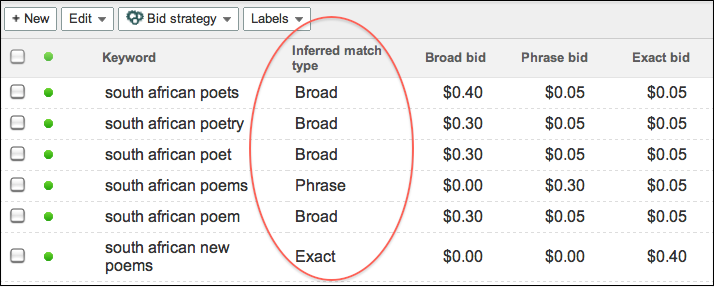
When we launched DS3, we provided the ability to set a bid for each match type on a Microsoft adCenter keyword. As each keyword could correspond to three match types and we couldn’t determine with certainty which match type caused the conversion, we were unable to populate the Match type column in reporting. However, many of you duplicated keywords to have a 1-to-1 match type relationship and asked us to display match type. As a result, the new Inferred match type column allows you to see a match type attributed to your adCenter keywords and makes it easier to compare keywords across engines.


DS3 infers the match type from the bids you have set for adCenter keywords:
  • - If a broad match bid is set (in other words, greater than 0), DS3 assumes it’s a broad match keyword.
  • - If a phrase match bid is set but not broad, DS3 assumes it's a phrase match keyword.
  • - If an exact match bid is set but not phrase or broad, DS3 assumes it's an exact match keyword.
  • - If a content match bid is the only bid set, DS3 will leave the Inferred match typecolumn blank.
After you select the Inferred match type column, you'll be able to see it in DS3 reporting on the UI and on downloaded reports. A few other things to keep in mind:
  • - To make it easier to compare keywords across engines, DS3 will copy the Match type column value into the Inferred match type column for Google AdWords and Yahoo! Search Marketing keywords.
  • - This is a read-only column: You won’t be able to update match type by changing the value in the Inferred match type column and uploading.
  • - This column does not appear in DoubleClick for Advertisers (DFA) reporting. You won’t be able to see a match type for adCenter keywords in DFA.

Upload email confirmations

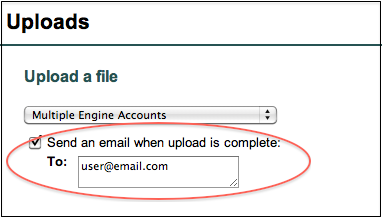
Tired of constantly checking the Uploads list to see if the spinny has stopped and your important upload processed? You can now opt to receive emails when an upload is complete. The email will contain a link to the upload page; if there are errors, you can download the error sheet from the uploads list, make corrections, and attempt the upload again.


Names for emailed reports

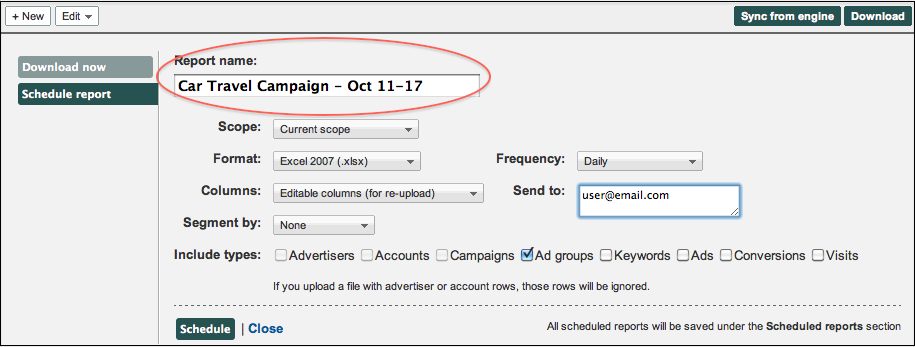
When you set up a report to be emailed from DS3, you can now customize the name that will appear in the email subject line. This is useful if the default name isn’t descriptive enough to differentiate between reports. For example, you could email two reports for the same campaign, but set up different date ranges, and include the date ranges in the report names.


To make sure you learn about new DS3 features as they’re released, enter your email address in the Follow by Email field in the upper righthand corner of the blog and click Submit. You’ll receive an email every time we add a post to the blog.

Posted by the DoubleClick Search Team
Read More
Posted in DoubleClick Search | No comments

Wednesday, 26 October 2011

Attend a DFA Classroom Training

Posted on 13:12 by Unknown

Attend a DoubleClick for Advertisers (DFA) classroom training and learn the fundamentals of DFA and become familiar with the ad trafficking process. Class details and upcoming dates are listed below.

Visit the DoubleClick Learn Center to register (sign-in required).

DFA Fundamentals: This all day course (10am-5pm) is useful for new DFA users who are looking to understand the fundamentals of third-party ad serving including best practices for campaign trafficking, serving your ads and pulling reports.

  • Chicago - November 16
  • San Francisco - November 30
  • New York - December 7

DFA Trafficking Lab: This lab provides users with practice at running campaigns. It covers basic DFA functionality including assigning landing pages to creatives, updating campaigns, setting up geo-targeting and using creative rotation. As a prerequisite, attendees should have taken the DFA Fundamentals class in the previous two months or have less than two months trafficking experience.

  • Chicago - November 17
  • San Francisco - December 1
  • New York - December 8

MediaVisor: Learn more about MediaVisor in this course that covers how to plan and create campaigns, advertisers, site placements and IOs as well as how to send RFPs.

  • Chicago - November 17

To sign up for any upcoming classroom training, visit the DoubleClick Learn Center (sign-in required). And be sure to check back with us on this blog for regular updates to our training schedule.

Posted by Amanda Gangl, DFA Product Trainer

Read More
Posted in DoubleClick for Advertisers, Training | No comments

Friday, 21 October 2011

Improved workflow and productivity in DS

Posted on 14:33 by Unknown
(cross posted from the DoubleClick Search blog. To learn more about DoubleClick Search, contact your Account Manager or request a call from a DoubleClick Search specialist.)

In addition to Floodlight segmentation, we’ve made some exciting enhancements to the DS3 UI over the past few weeks, including new filter options, keyword defaults, and a settings bar for campaigns and ad groups. Read on to learn how these new features can help you work faster and better in DS3.

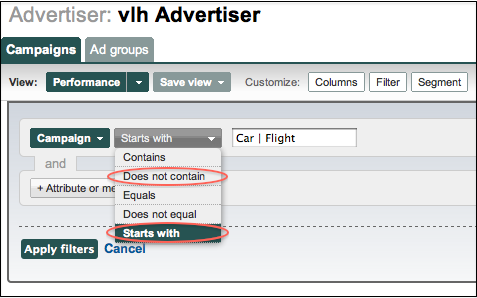
New filter options: ‘Does not contain’ and ‘Starts with’

When you set up a filter that has the options Contains, Equals, and Does not equal, there are now two additional options: Does not contain and Starts with. When combined with the recently released ability to filter by multiple terms, you have an even more powerful set of filtering options.


Apply default settings to keywords

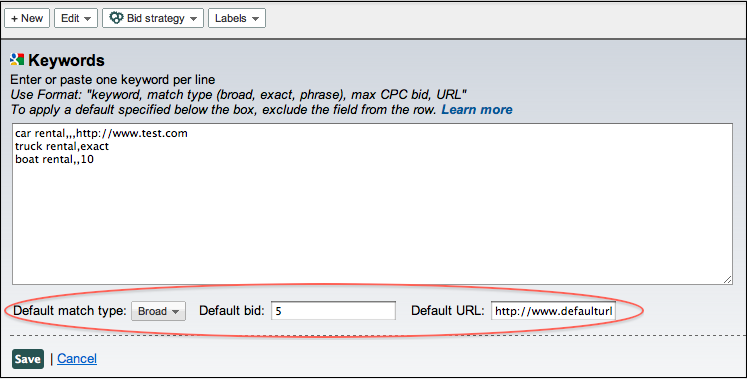
When creating keywords in the DS3 UI, you can now apply default values to keywords as you enter them in the text box. This makes it easy to apply the same values to several keywords, while also customizing the settings for some keywords when needed.

For example, if one keyword in an ad group is performing well, you can set a specific max CPC bid of $10, while keeping all other keywords at the default bid of $5. To apply a default, exclude the field from the row in the text box. Learn more about the proper formatting of default keyword settings in the Help Center.


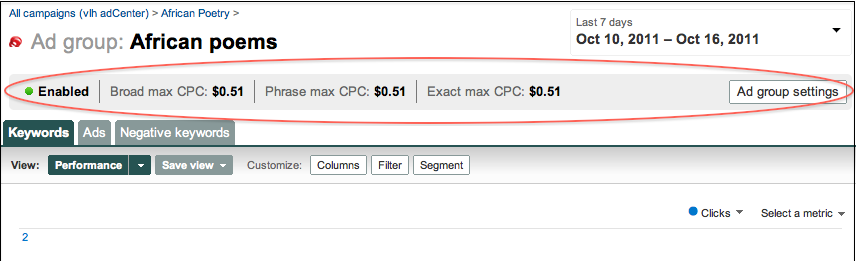
New settings bar for campaigns and ad groups

When you select a campaign or ad group in DS3, you’ll now see a settings bar near the top of the page. This bar gives you a quick overview of campaign/ad group settings. If you need to make a change, you can simply click the Campaign settings or Ad group settings button and edit the settings in the inline panel that appears. Look for even more useful information in this bar in the future.


For more information about the latest DS3 release, including fixes to known issues, check out the release notes. And keep an eye on the blog for information about improvements to uploads, downloads, and reporting!

Posted by the DoubleClick Search Team
Read More
Posted in DoubleClick Search | No comments

Thursday, 13 October 2011

Counting All the Cookies in Ad Planner

Posted on 11:26 by Unknown

We’re always looking at ways to improve data in DoubleClick Ad Planner. For example, back in April we changed the algorithm for calculating unique visitors (users). Now we are also updating the way we estimate unique visitors (cookies). Generally you should see this value go up across the board which will more accurately represent the relationship between real people and cookies.

Previously we looked at a sample of cookies for a site and built a model to extrapolate overall statistics for that site. Now we have a much smarter process where we look at the overall number of cookies on a site and use that to estimate overall traffic, resulting in bigger, more accurate, values. As before, we look only at the aggregate number of cookies, not the cookies themselves.

The Ad Planner product team is continually striving to bring the most accurate and comprehensive view of sites on the internet to our users. The end result of this latest effort is that now you’ll see more accurate cookie values represented in Ad Planner.

Roshan Khan, Product Manager

Read More
Posted in DoubleClick Ad Planner | No comments

Tuesday, 4 October 2011

Ushering in a New Era for DFA Reporting

Posted on 13:02 by Unknown

You might notice a small change when you sign in to DoubleClick for Advertisers today -- the link to DFA Analytics at the top of the page now reads “DFA Reporting.” Although this is a small change to the interface, it represents a big step towards an entirely new reporting system in DFA -- one that is fast and flexible, fully integrated with other DoubleClick advertiser products and that can deliver key insights in this world of advertising to the multi-device, always-on consumer.

The rubber met the road with last month’s reporting launch of Report Builder and Multi-Channel Funnels in DFA, representing the first of many exciting new developments for reporting in the coming year.

Please join the DoubleClick product management team for an upcoming webinar, Introducing the New DFA Reporting, to learn more about these major enhancements to DFA’s reporting system.

Date
October 18, 2011

Time
12:30pm EST / 9:30am PST

Register
To register for this webinar please visit http://tinyurl.com/dfareporting

We look forward to hearing your feedback and questions during the webinar!

Posted by Pamela Eng, Product Marketing Manager

Read More
Posted in DoubleClick for Advertisers, Webinars | No comments

Attend a DFA Training in October

Posted on 09:24 by Unknown

Whether you're looking to brush up on certain features of DoubleClick for Advertisers or are entirely new to using the product, the DFA training team offers a variety of training experiences that best suit your needs. In addition to in-person classroom training for a deep dive on the product, we also offer a regular rotation of webinars focused on a particular hot topic.

Visit the DoubleClick Learn Center to register (sign-in required).

Classroom Training

DFA Fundamentals: This all day course (10am-5pm) is useful for new DFA users who are looking to understand the fundamentals of third-party ad serving including best practices for campaign trafficking, serving your ads and pulling reports.

  • Chicago - October 19
  • Minneapolis - October 24
  • Santa Monica - October 24
  • San Francisco - October 26
  • New York - November 2

DFA Trafficking Lab: This lab provides users with practice at running campaigns. It covers basic DFA functionality including assigning landing pages to creatives, updating campaigns, setting up geo-targeting and using creative rotation. As a prerequisite, attendees should have taken the DFA Fundamentals class in the previous two months or have less than two months trafficking experience.

  • Chicago - October 20
  • Minneapolis - October 25
  • Santa Monica - October 25
  • San Francisco - October 27
  • New York - November 3

MediaVisor: Learn more about MediaVisor in this course that covers how to plan and create campaigns, advertisers, site placements and IOs as well as how to send RFPs.

  • New York - November 3

Webinar Training This month join us for webinars focusing on how to work with Ads in DFA. For those not able to attend the classroom training sessions, we also offer monthly webinars for both DFA and MediaVisor Fundamentals.

DFA Ads - Making Them Work for You - October 11 This webinar will teach you the fundamentals of setting up ads in DFA while thinking strategically about campaigns. We'll tackle questions such as "how can you set up ads as efficiently as possible?" and "how do you manage start and end dates so that the right things run at the right time?" and "how do you avoid serving too many defaults?"

Priority, Frequency Capping, Targeting and Other Ad Level Capabilities - October 18 DFA gives you the flexibility to do a lot with your ads, you just have to discover the possibilities. This webinar will teach you how to leverage things like priority, frequency capping, and targeting in order to enhance your campaigns.

Click Trackers and 1x1's - Getting it Right - October 25 Did you know that you can track site-served creatives using DFA? Do you know how to best work with sites to ensure that click trackers get implemented correctly? Well, we can teach you. Trafficking these types of ads can get tricky and we're here to show you how to get it right.

DFA for New Users - October 12 and October 26 An introduction to the fundamentals of DFA.

MediaVisor Fundamentals - October 18 An introduction to the fundamentals of MediaVisor.

To sign up for all upcoming webinars and view recordings of past webinars, visit the DoubleClick Learn Center (sign-in required). And be sure to check back with us on this blog for regular updates to our training schedule.

Posted by Amanda Gangl, DFA Product Trainer

Read More
Posted in DoubleClick for Advertisers, Training | No comments
Newer Posts Older Posts Home
Subscribe to: Comments (Atom)

Popular Posts

  • Cutting Complexity, Adding Value: Unified Ad Tech Efficiencies Could Save Marketers 33%
    Digital marketing delivers powerful results for advertisers -- but running digital campaigns has become too complex. Google commissioned The...
  • Attend an upcoming DoubleClick Bid Manager training webinar
    If you're interested in boosting your DoubleClick Bid Manager expertise, be sure to join our upcoming webinars. Register in the DoubleCl...
  • Tutorial Tuesday: Add a new dimension to your work with the Google Web Designer CSS Panel
    Welcome to week three of our Google Web Designer Tutorial Tuesday series. So far, we have given you an overview of the tool’s interface and...
  • An Important Step Towards Reducing Discrepancies
    It is often noted by industry observers that transaction costs for online display media remain unnecessarily high. Discrepancies are a big p...
  • Future of Advertising Event - DoubleClick Insights
    There has been explosive growth in ad technology over the last 20 years. From each of our perspectives -- whether you are an agency, an adve...
  • Introducing Ad Exchange Direct Deals
    The rise of Ad Exchanges has made it easier for buyers and sellers to connect, using technologies such as real-time bidding (RTB) to help un...
  • DoubleClick Digital Marketing helps you create, buy and manage your mobile and video campaigns
    In today's digital marketing landscape, it's becoming increasingly crucial for campaigns to span multiple screens and ad formats in ...
  • Making Mobile Rich Media Front and Center in DoubleClick Studio
    At the end of September, we announced the launch of Google Web Designer, Google’s new HTML5 authoring tool, and last week we propelled the ...
  • Mobile click-to-call in DFA
    The mobile features in DoubleClick for Advertisers (DFA) make it easy to traffic mobile ads alongside the rest of your online ads. Our mobil...
  • Latest Display Benchmarks Now Available
    Evaluating the success of display campaigns can be an exercise in relativity. You gauge current campaigns against past performance or compar...

Categories

  • active view
  • ad creative
  • AdSense
  • Advanced training
  • advertisers
  • Announcements
  • API
  • attribution
  • attribution modeling
  • banner ads
  • brands
  • Cadillac
  • call tracking
  • case study
  • certification
  • consolidation
  • conversion
  • creativity
  • customer examples
  • data
  • data insights
  • dcm
  • DDM
  • DFA
  • DFA Academy
  • DFA6
  • digital marketing
  • Display
  • display benchmarks
  • doubleclick
  • DoubleClick Ad Exchange
  • DoubleClick Ad Planner
  • doubleclick bid manager
  • doubleclick campaign manager
  • doubleclick digital marketing
  • doubleclick floodlight
  • DoubleClick for Advertisers
  • DoubleClick for Publishers
  • DoubleClick Rich Media
  • DoubleClick Search
  • doubleclick studio
  • DSP
  • dynamic creative
  • Events
  • Forrester
  • Google
  • google analytics
  • Google analytics premium
  • google tag manager
  • Google Web Designer
  • hangout on air
  • HTML5
  • IAB
  • IAB rising stars
  • in-stream
  • Industry
  • industry benchmarks
  • Industry Commentary
  • insights
  • interactive in-stream
  • Invite Media
  • Kellogg's
  • launch
  • Lightbox
  • media buying
  • Mindshare
  • MIXX
  • Mobile
  • multi-channel funnels
  • native ads
  • Neal Mohan
  • new features
  • New Release
  • News
  • optimization
  • platform
  • Programmatic
  • Programmatic video
  • publishers
  • Real-time Bidding
  • remarketing
  • reporting
  • Reporting and Analytics
  • Research
  • Rich Media
  • Social Media
  • Studio Certification
  • tag
  • The Weather Channel
  • thinkdoubleclick
  • Tips and Tricks
  • Trafficking
  • Training
  • twohill
  • Updates
  • Video
  • VPAID
  • webinar
  • Webinars
  • Wildfire
  • YouTube

Blog Archive

  • ►  2013 (89)
    • ►  November (5)
    • ►  October (16)
    • ►  September (5)
    • ►  August (10)
    • ►  July (5)
    • ►  June (8)
    • ►  May (12)
    • ►  April (8)
    • ►  March (7)
    • ►  February (7)
    • ►  January (6)
  • ►  2012 (60)
    • ►  December (7)
    • ►  November (9)
    • ►  October (8)
    • ►  September (5)
    • ►  August (5)
    • ►  July (2)
    • ►  June (5)
    • ►  May (6)
    • ►  April (5)
    • ►  March (5)
    • ►  February (1)
    • ►  January (2)
  • ▼  2011 (56)
    • ►  December (5)
    • ►  November (11)
    • ▼  October (7)
      • Case Study: DoubleClick Ad Exchange Helps Advertis...
      • New features in DS3: Inferred match type, upload e...
      • Attend a DFA Classroom Training
      • Improved workflow and productivity in DS
      • Counting All the Cookies in Ad Planner
      • Ushering in a New Era for DFA Reporting
      • Attend a DFA Training in October
    • ►  September (3)
    • ►  August (5)
    • ►  July (2)
    • ►  June (6)
    • ►  May (3)
    • ►  April (5)
    • ►  March (4)
    • ►  February (3)
    • ►  January (2)
  • ►  2010 (32)
    • ►  December (2)
    • ►  November (4)
    • ►  October (3)
    • ►  September (1)
    • ►  August (4)
    • ►  July (4)
    • ►  June (3)
    • ►  May (2)
    • ►  April (4)
    • ►  March (3)
    • ►  February (2)
  • ►  2009 (12)
    • ►  November (1)
    • ►  October (1)
    • ►  September (1)
    • ►  August (1)
    • ►  June (2)
    • ►  May (1)
    • ►  April (1)
    • ►  March (2)
    • ►  February (2)
  • ►  2008 (15)
    • ►  December (1)
    • ►  November (1)
    • ►  October (2)
    • ►  August (1)
    • ►  March (2)
    • ►  February (2)
    • ►  January (6)
  • ►  2007 (11)
    • ►  December (2)
    • ►  November (3)
    • ►  October (3)
    • ►  August (1)
    • ►  July (1)
    • ►  May (1)
Powered by Blogger.

About Me

Unknown
View my complete profile