Html5 Mobile Support

  • Subscribe to our RSS feed.
  • Twitter
  • StumbleUpon
  • Reddit
  • Facebook
  • Digg

Monday, 18 April 2011

Tracking Mobile Conversions in DFA

Posted on 19:05 by Unknown

When talking to advertisers about mobile advertising, one topic that comes up again and again is the need for consistent, independent ROI tracking for their mobile campaigns. As users spend even more time in Mobile Apps and on the Mobile Web, these have become excellent channels for advertisers to reach their customers. However, despite the growth in scale and innovation in formats it has remained difficult to use just a single solution to track the performance of all those campaigns and to compare them to their online advertising counterparts.

We’ve been listening and are excited to announce two improvements to our mobile ad serving solution today that will help advertisers do just that.

Tracking conversions for mobile ads
First up, we are pleased to introduce conversion reporting for mobile ads in DoubleClick for Advertisers (DFA). Now it is possible to see post-click conversions for mobile ads right alongside your existing conversion reports for display ads, enabling even more efficient allocation of budget.

To enable conversion tracking for a mobile site you can use exactly the same Floodlight tags as regular DFA conversion tracking. We’ve optimized the system to handle the quirks of cookie handling and javascript support on different mobile devices so it now supports a huge range of mobile phones, from older generation phones to the latest model smart phones covering the vast majority of the mobile traffic that we see. In addition, because it uses Floodlight, mobile conversion tracking in DFA allows you to use conversion counters and even e-commerce tags with your mobile campaigns so that you can track not just visits and actions but value too.

Now that mobile conversion reporting is captured in DFA, you have more information at your disposal to better understand the elements (search, display, apps and websites) driving traffic to your mobile websites and to compare them directly to the online campaigns you are already running.

Click trackers for mobile placements
DFA users create click trackers to record the number of clicks on text links, links in emails, or on other elements that are hard-coded on a website. They can also be used to track clicks on creatives that are not delivered by DFA, including clicks on distinct parts of multi-file creatives.

Now we are allowing clicking tracking in DFA to include mobile placements so that you can track clicks on site-served creatives or text ads (such as search ads) on mobile sites, with reporting by platform, carrier and country. These click-trackers are also optimized to use the same conversion tracking system as regular mobile ads in DFA.

>> Read more (login required)

Expect to see further enhancements in the coming months to DFA to enable you to serve mobile ads with the same ease and functionality as the display ads that you already serve through the system.

Posted by Alex Gawley, Product Manager

Read More
Posted in DoubleClick for Advertisers, Mobile | No comments

Travel and Taxes are Top of Mind in February’s Ad Planner 1000

Posted on 15:15 by Unknown

The second installment of the Ad Planner 1000 list for 2011 saw similar trends to January in a few major areas, while a couple major events drove attention to additional sites.

Travel is still on the rise, as the popular travel aggregators priceline.com, travelocity.com, travelzoo.com (+10%), and booking.com (+7%) had a strong showing for a second consecutive month.

While not as drastic as the previous month, well known outlets such as sears.com (-16%), walmart.com (-13%), costco.com (-13%), bestbuy.com (-11%), overstock.com (-10%), macys.com(-9%), and jcpenney.com (-7%) still saw declines in visitors to their sites.

Also following last month’s trend, the upcoming tax season continues to boost irs.gov (+45%) and TurboTax sales keep driving up intuit.com (+10%). Folks are also turning to tax advisors, with hrblock.com making its 2011 debut in the top sites list at #803.

Sports in February saw an end to the football season (with a thrilling Green Bay victory), and a subsequent drop to nfl.com (-49%). To pick up the slack, the 2011 NBA All-Star Game was played in Los Angeles this month and drove up traffic for nba.com (+12%).

After multiple delays and rescheduling, the long-awaited final mission of Space Shuttle Discovery finally took off on February 24th. This event and the anticipation leading up to it also likely launched interest in nasa.gov (+24%).

Finally in tech news, the 2011 Mobile World Congress took place in mid-February in Barcelona. Google announced Android 3.0, its first OS built for tablets and android.com debuted on our list at #680.

Posted by Alex Lin, Product Specialist

Read More
Posted in DoubleClick Ad Planner | No comments

Tuesday, 12 April 2011

DoubleClick Search V3: More Features to Whet Your Appetite

Posted on 20:24 by Unknown

(Cross-posted from the DoubleClick Search blog)

The DoubleClick Search team has been hard at work to bring you a slew of great new features you’ve been asking for. A month ago we released the new agency and advertiser home pages. Two weeks ago we unveiled the DS3 preview. Today we continue the momentum with the launch of three new features in DS3. All of these are live and available to use starting today.

Find What’s Most Important With Filters
With filters you can sift your data down to just the campaigns, ad groups, ads or keywords that you care about. Filtering can be done on statistics such as clicks, impressions, or transactions as well as attributes like campaign budget, or keyword name. Filters are also saved as part of the report view. Once you’ve saved a report view it’s as easy as two clicks to review your best performing keywords, find ad groups with unusually high cost per clicks or pretty much any way you’d like to slice and dice your search advertising campaigns.

Really large bulksheets can take a long time to upload, and previously it was difficult to tell just how far along it was. But there’s one thing worse than not knowing when the upload will complete. It’s realizing you mistakenly clicked on the wrong file and watching helplessly in horror as it gets uploaded and processed.

Starting today, users of DS3 no longer have to worry - bulksheet uploads now include a progress bar, as well as the ability to cancel any upload in flight. We can’t help you pick the right file the first time, but now you can easily correct an errant click.

Drag and Drop Customized Columns
DS3 already includes powerful column customization that lets you customize and save report views. Today we’ve made column choosing even easier by adding the ability to drag and drop columns to change the order they show for reports.

This is just the beginning - we’ve got a ton of new features in store for you over the coming weeks and months.

If you like what you see already and are interested in upgrading to DoubleClick Search V3, contact your TAM for more information.

Stay tuned to the DoubleClick Search blog for the latest!

Posted by Vanessa Howell, Product Manager

Read More
Posted in DoubleClick Search | No comments

Wednesday, 23 March 2011

New! Rich Media Metrics in DFA Analytics(beta)

Posted on 07:17 by Unknown

The power of DFA Analytics rests in its visually-driven views of campaign performance with easy-to-understand charts and graphs. Drill-down reporting allows you to view performance at multiple levels and across dimensions such as geography, browser, operating system and connection speed, regardless of whether targeting was implemented during campaign setup.

We’re pleased to announce that with this latest release of DFA Analytics, we’re making the tool even more powerful by incorporating standard DoubleClick Rich Media metrics. New metrics include:

  • Impressions
  • Click Rate
  • Backup Image
  • Average Display Time
  • Interaction Rate and Time
  • Number of Expansions and Expansion Time
  • Number of Video Plays and Average Video View Time

DFA Analytics updates the data continuously throughout the day and provides you with a quick and easy way to glance at reporting and verify that your recently trafficked campaigns have gone live and are running smoothly. For example, you could monitor potential issues with your campaign by checking on the number of backup images being served up.

Rich Media metrics in DFA Analytics also allow you to drill down your analysis to any level, from account on down to advertisers, campaign, site, ad and creative. Graph results to compare different Rich Media metrics such as the average display time against average video view time over time. Get deeper insight into how your campaign is performing over time by charting results by day, week or month. Go further by benchmarking a campaign’s interaction rate against that of the whole advertiser. Or get a quick pulse on the success of your in-banner video ads by viewing the number of video plays your campaign is receiving.

We’re continuously adding new features to DoubleClick for Advertisers, so expect to see frequent improvements to DFA Analytics in the coming months.

Posted by Aaron Nelson, Product Manager

Read More
Posted in DoubleClick for Advertisers, DoubleClick Rich Media, Reporting and Analytics | No comments

Tuesday, 22 March 2011

Your life as a search professional is about to get much easier

Posted on 14:17 by Unknown

(Cross-posted from the DoubleClick Search blog)

DoubleClick Search began in 2006, a tool for larger agencies and advertisers running large-scale online advertising campaigns across multiple platforms. It’s designed to manage the execution of paid search campaigns and centralize the measurement of performance across search and display advertising.


Think of search campaign management like an air traffic control system: directing one airplane to take off from a given airport at the right time is relatively simple. Coordinating thousands of airplanes, across many airports is more complex. The same is true of search campaigns: managing a search campaign is easy, but managing multiple campaigns and search engines, and comparing performance of search and display strategies, can be more difficult.

Today at SES New York, we’re giving the first glimpse of the latest version of DoubleClick Search (version 3), designed to make these tasks simpler.

We’ve spent the last 9 months talking to our customers and agency partners about what you want from a search campaign management tool, and we’ve heard you loud and clear: you want a powerful solution that lets you manage millions of keywords, across the leading search engines, from a fast, easy-to-use platform. So we took a look at our existing DoubleClick Search product and decided to rebuild it from scratch, designing it to take the activities you do on a daily basis and make them simpler, faster and more effective.

We are currently beta testing DoubleClick Search v3 with select partners and will be rolling it out to all partners later this year. Here are a few ways we’ve made our DoubleClick Search product better:

Workflow: We’ve simplified navigation with an easy-to-use, AdWords-like interface and enabled you make changes to your campaign directly from DoubleClick Search or directly in the search engines. We’ve also added the ability to upload campaigns in spreadsheets with up to 1 million rows, and manage campaigns globally with many language and currency options.

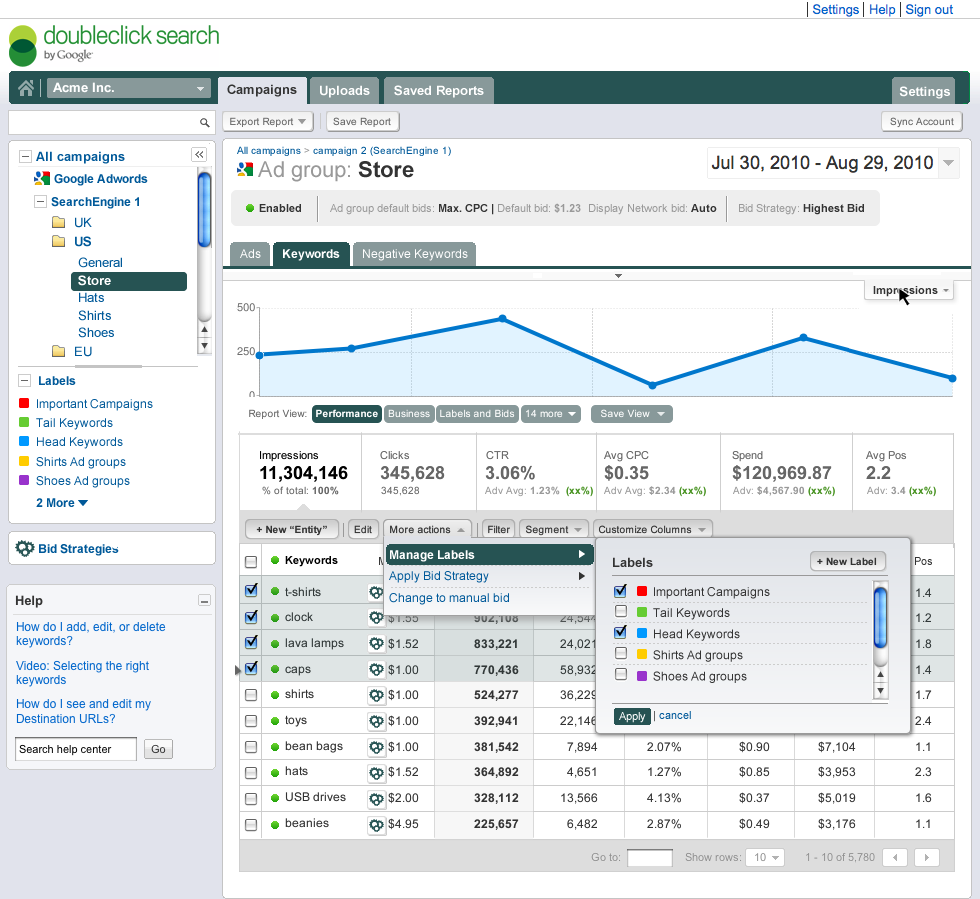
Reporting: DoubleClick Search now includes powerful filters and labels that allow you to highlight important keywords. Our revamped reporting features also allow you to manage where your ads appear with precise position controls, design your bidding strategy to meet specific ROI goals, and compare how your campaigns are performing across search and display, thanks to seamless integration with DoubleClick’s display platform, DoubleClick for Advertisers.

Optimization: We’ve given you new tools to enhance optimization, including the ability to view performance data across all the major search engines and a customizable reporting view so you can focus on what matters most to your business.

Here is a sneak peek at what the new DoubleClick Search will look like:


(Mock screenshot)

There will be more news in the weeks and months ahead, so please be sure to check back at our DoubleClick Search blog.

Posted by: Ariel Bardin, Director of Product Management
Read More
Posted in DoubleClick Search | No comments

Thursday, 17 March 2011

Simplifying Conversion Tracking in DFA: Floodlight is the new Spotlight

Posted on 09:16 by Unknown

This past week we made a big step to simplify conversion tracking in DoubleClick for Advertisers (DFA). Now by default all tags in DFA will be referred to as “Floodlight” tags, and “Spotlight” as a name is being retired in the system.

Our goal is to make conversion tracking easier to understand while enabling more of our customers to take full advantage of our most up-to-date conversion tracking technology using iFrames.

So where you used to see the term “Spotlight” in the interface, you will now see “Floodlight in its place. For example, as you can see in this screenshot, the tabs formerly labeled as Spotlight Configuration and Spotlight Activities are now labeled Floodlight Configuration and Floodlight Activities.

Another instance where you will notice the change is in ReportCentral, where queries with “Spotlight” in the name will now show up as “Floodlight” instead. The Shared Spotlight report is now named the Shared Floodlight report, for example. Field names and metric definitions have been updated, but all data will be calculated the same way as before.

Permissioning for dynamic tags
Previously, the key feature of Floodlight was dynamic tags — the default and publisher tags that you can use to deliver additional code whenever your Floodlight activities are triggered.

If Floodlight was enabled for your DFA account prior to March 12, you can automatically use dynamic tags with all of your advertisers. Advertisers that were previously using Floodlight will have dynamic tags enabled automatically. To switch them on for other advertisers, just go to the Floodlight Configuration tab for the advertiser.

By default, dynamic tags are not available for new DFA accounts or for accounts that were not enabled for Floodlight before March 12. To begin using dynamic tags, at no additional charge, you'll need to sign an agreement with us, similar to the agreement required previously to use Floodlight.

Easy to switch back to image tags
If there are certain instances where you prefer to serve an image tag (what use to be referred to as a Spotlight tag) instead, you can easily switch to using image tags for a single activity, all activities within an advertiser, or across all activities in your DFA account.

No retagging required
The good news is that no retagging is required. All of your existing tags — both Spotlight and Floodlight — created before March 12 will continue to work as normal.

Simplifying conversion tags is just one of many enhancements to DFA over the course of 2011 to ensure it is the most efficient, easy-to-use and integrated ad serving system available.

Posted by Josh Ross, Technical Writer

Read More
Posted in DoubleClick for Advertisers | No comments

Wednesday, 16 March 2011

Preview DoubleClick Search V3 on March 22 at SES in NYC

Posted on 13:59 by Unknown

(Cross-posted from the DoubleClick Search blog)

Over the past few months, we've been hard at work on a brand new version of DoubleClick Search. With significant improvements in workflow, optimization, and reporting, DoubleClick Search V3 was built to make your life as a search professional much easier.


Please come see DoubleClick Search V3 and meet the AdWords and DoubleClick Search executive team. The session will take place on March 22 from 1:30 PM to 2:30 PM at SES New York. 


Also, visit our booth in the Expo Hall (#1001) for a personal meeting with the AdWords and DoubleClick Search team. 
We're looking forward seeing you at SES in NYC.

Posted by Fredrik Keerberg, Product Marketing Manager

Read More
Posted in DoubleClick Search | No comments
Newer Posts Older Posts Home
Subscribe to: Posts (Atom)

Popular Posts

  • Introducing an all-new DFA: DoubleClick Campaign Manager
    The phase of adolescence is a transitional one, and this year, on the 15th anniversary of DoubleClick for Advertisers (DFA) we find ourselve...
  • Insights on the fly: Introducing executive reporting from DoubleClick Search
    Search marketers managing multiple campaigns across multiple accounts have to visualize their data in many different ways and tailor reporti...
  • Congratulations DMACs Award Winners
    Congratulations to the winners of the fifth annual Digital Media Advertising Creative Showcase (DMACS) awards! The event took place Thursda...
  • Streamlined Workflow for AdMob Rich Media in DoubleClick Studio and DFA
    Since the launch of DoubleClick Studio in April 2009, we’ve streamlined the workflow for thousands upon thousands of rich media creatives f...
  • DS3: Announcing Several Upload Improvements
    (cross posted from the DoubleClick Search blog . To learn more about DoubleClick Search, contact your Account Manager or request a call from...
  • A new (and improved) look for the DoubleClick site
    Last week, you heard from Neal Mohan at DoubleClick Insights talk about how the digital ad ecosystem is rapidly evolving. To help digital m...
  • Making Mobile Rich Media Front and Center in DoubleClick Studio
    At the end of September, we announced the launch of Google Web Designer, Google’s new HTML5 authoring tool, and last week we propelled the ...
  • Get Your DFA Fundamentals Certification
    We are pleased to announce DoubleClick for Advertisers (DFA) Fundamentals Certification! DFA Fundamentals Certification is the next step for...
  • +1 Button in DFA: Leveraging Social Recommendations in Your Display Ads
    Last March, Google introduced the +1 button on search results to make it easier for people to get recommendations from the people they trus...
  • Extend Your Reach with Remarketing on the Google Content Network
    If you've used remarketing in DoubleClick for Advertisers (DFA) then you know how effective it can be in delivering highly targeted and ...

Categories

  • active view
  • ad creative
  • AdSense
  • Advanced training
  • advertisers
  • Announcements
  • API
  • attribution
  • attribution modeling
  • banner ads
  • brands
  • Cadillac
  • call tracking
  • case study
  • certification
  • consolidation
  • conversion
  • creativity
  • customer examples
  • data
  • data insights
  • dcm
  • DDM
  • DFA
  • DFA Academy
  • DFA6
  • digital marketing
  • Display
  • display benchmarks
  • doubleclick
  • DoubleClick Ad Exchange
  • DoubleClick Ad Planner
  • doubleclick bid manager
  • doubleclick campaign manager
  • doubleclick digital marketing
  • doubleclick floodlight
  • DoubleClick for Advertisers
  • DoubleClick for Publishers
  • DoubleClick Rich Media
  • DoubleClick Search
  • doubleclick studio
  • DSP
  • dynamic creative
  • Events
  • Forrester
  • Google
  • google analytics
  • Google analytics premium
  • google tag manager
  • Google Web Designer
  • hangout on air
  • HTML5
  • IAB
  • IAB rising stars
  • in-stream
  • Industry
  • industry benchmarks
  • Industry Commentary
  • insights
  • interactive in-stream
  • Invite Media
  • Kellogg's
  • launch
  • Lightbox
  • media buying
  • Mindshare
  • MIXX
  • Mobile
  • multi-channel funnels
  • native ads
  • Neal Mohan
  • new features
  • New Release
  • News
  • optimization
  • platform
  • Programmatic
  • Programmatic video
  • publishers
  • Real-time Bidding
  • remarketing
  • reporting
  • Reporting and Analytics
  • Research
  • Rich Media
  • Social Media
  • Studio Certification
  • tag
  • The Weather Channel
  • thinkdoubleclick
  • Tips and Tricks
  • Trafficking
  • Training
  • twohill
  • Updates
  • Video
  • VPAID
  • webinar
  • Webinars
  • Wildfire
  • YouTube

Blog Archive

  • ▼  2013 (89)
    • ▼  November (5)
      • What industry leaders value in a digital marketing...
      • Become a video expert: learn to create innovative,...
      • Insights on the fly: Introducing executive reporti...
      • DoubleClick “Stocking Stuffers”: Festive strategie...
      • Making Mobile Work Across the Advertising Industry
    • ►  October (16)
    • ►  September (5)
    • ►  August (10)
    • ►  July (5)
    • ►  June (8)
    • ►  May (12)
    • ►  April (8)
    • ►  March (7)
    • ►  February (7)
    • ►  January (6)
  • ►  2012 (60)
    • ►  December (7)
    • ►  November (9)
    • ►  October (8)
    • ►  September (5)
    • ►  August (5)
    • ►  July (2)
    • ►  June (5)
    • ►  May (6)
    • ►  April (5)
    • ►  March (5)
    • ►  February (1)
    • ►  January (2)
  • ►  2011 (56)
    • ►  December (5)
    • ►  November (11)
    • ►  October (7)
    • ►  September (3)
    • ►  August (5)
    • ►  July (2)
    • ►  June (6)
    • ►  May (3)
    • ►  April (5)
    • ►  March (4)
    • ►  February (3)
    • ►  January (2)
  • ►  2010 (32)
    • ►  December (2)
    • ►  November (4)
    • ►  October (3)
    • ►  September (1)
    • ►  August (4)
    • ►  July (4)
    • ►  June (3)
    • ►  May (2)
    • ►  April (4)
    • ►  March (3)
    • ►  February (2)
  • ►  2009 (12)
    • ►  November (1)
    • ►  October (1)
    • ►  September (1)
    • ►  August (1)
    • ►  June (2)
    • ►  May (1)
    • ►  April (1)
    • ►  March (2)
    • ►  February (2)
  • ►  2008 (15)
    • ►  December (1)
    • ►  November (1)
    • ►  October (2)
    • ►  August (1)
    • ►  March (2)
    • ►  February (2)
    • ►  January (6)
  • ►  2007 (11)
    • ►  December (2)
    • ►  November (3)
    • ►  October (3)
    • ►  August (1)
    • ►  July (1)
    • ►  May (1)
Powered by Blogger.

About Me

Unknown
View my complete profile