Html5 Mobile Support

  • Subscribe to our RSS feed.
  • Twitter
  • StumbleUpon
  • Reddit
  • Facebook
  • Digg

Monday, 7 November 2011

Bringing AdMob Mobile Inventory to the DoubleClick Ad Exchange

Posted on 10:15 by Unknown

In 2009, we launched the DoubleClick Ad Exchange as a way to simplify the process of buying and selling display advertising, drive performance for our advertiser and publisher partners, and open up the display marketplace. In the two years since, exchange-based trading has taken off -- we’ve seen the volume of trades on our own exchange grow by more than 150% in the past year. At the same time, display, as a medium, has evolved.

Display started as just banner ads on websites, but has grown to include a range of formats as diverse as the web itself -- rich media ads that bring a page to life, in-stream ads that play before your favorite online video, and ads that run in the mobile version of your daily newspaper. To reflect this growing diversity, we have been expanding the types of formats in the Exchange. We support the most popular types of rich media ads, including units that run in-page with video, or expand when you click or mouse over them. It’s also possible to buy ads across the mobile web. Earlier this year, we announced that in-stream video formats were coming to the Exchange, and we’ve seen huge demand since launch: the number of buyers for in-stream video has tripled over the past quarter.

Today, we are announcing another step forward -- in the coming weeks, AdMob developers will be able to make their in-app inventory available on the DoubleClick Ad Exchange. Initially, a small number of pre-qualified buyers will be able to compete for this inventory. Over time, we'll be rolling it out more broadly. Ultimately, this will give app developers and publishers access to a wider pool of buyers like demand-side platforms and agency trading desks, improving their potential returns, and helping grow the overall mobile web economy. And marketers on our Exchange will be able to buy, in real time, ads that run inside people’s favorite mobile games, news apps and more. With this important addition, the DoubleClick Ad Exchange will be truly cross-format...and will become the first exchange to support this full range of ad formats.

VivaKi, one of our key partners on the Exchange, is gearing up to start buying in-app ads on the Exchange. “We are delighted to be working with Google as they open up the DoubleClick Ad Exchange to include AdMob in-app inventory, and to deliver this opportunity to our clients,” says Kurt Unkel, Senior Vice President, VivaKi Nerve Center. “We anticipate this experience will help us bring mobile to scale to our partners, and will provide insight into the operational elements and the creative assets that work best in this environment.”

A cross-format exchange is just one of the ways we’re looking to simplify the process of buying and selling display advertising, but one we think will create tremendous value for advertisers and publishers. We will continue to work with our partners to help them get the most out of what the evolving display market has to offer -- today, tomorrow, and in the years ahead.

Posted by Chip Hall, Director, DoubleClick Ad Exchange

Read More
Posted in DoubleClick Ad Exchange, Mobile, News | No comments

Thursday, 3 November 2011

Webinar Recap: Introducing the New DFA Reporting

Posted on 07:22 by Unknown

On Tuesday, October 18, we held a webinar introducing the new DFA Reporting suite covering:

  • The vision for how we’re building the next generation of reporting tools
  • Details of the new reporting query tool, Report Builder
  • Scenarios of how to best use the new Multi-Channel Funnel reports in DFA

For those of you who missed the webinar, a recorded version is now available, which you can watch below. You can also download the materials we covered here.


During the presentation we fielded some great questions from participants; you’ll find responses to the top questions below.

Q. We’ve always been told that since DFA Analytics was in beta, data was not guaranteed and so we were directed to Report Central. Is Report Builder now as trusted and accurate as Report Central?
A. Yes, getting data as accurate as possible between the two systems is a number one priority so yes, you can trust the accuracy of data available in Report Builder. The user interface in Report Builder is in beta so keep in mind that we will be continuously tweaking and improving the user experience of the tool but consider the data as accurate as in ReportCentral.

Q. How far back can you pull data in Report Builder?
A. With Report Builder, we will store data for 24 months - an improvement over the legacy system, ReportCentral, where you can pull the last 16 months of data.

Q. Is ReportCentral being discontinued?
A. Yes but as of now there is no set date as to when that will happen. Of course, we will give clients plenty of lead time to prepare for this. But the end goal is to have DFA Reporting completely replace ReportCentral.

Q. Is there a plan to roll out real-time reporting?
We’re always striving to update DFA data more frequently and will continue to do so. For example, in the old Report Central, we updated data once per day, whereas in the new Report Builder we update data several times a day.

Q. Regarding geo-reporting, can I visualize reports on a map with performance broken down by DMA? Currently, when we pulled maps it only shows statewide delivery and ideally we would like to see multiple DMAs overlayed in the same map.
A. In Report Builder you can pull results by geo dimensions including DMA, country, state, city, but we don’t have that feature available in the map visualizations yet. But it’s a good suggestion to add that feature.

Q. When will geo-reporting be available for Europe?
A. Geo data is currently available for Europe but only down to the country and city level at this point. We will be expanding into more granular geo-data in the future for Europe.

Q. I still don’t understand the attribution report. Where can I see how many (last-click) conversions a publisher generated versus how many assisted conversions generated (not last-click conversions). I can see that in Google Analytics, but I am not seeing the same here.
A. In Google Analytic’s Multi-Channel Funnel Report, they have an Assisted Channel Conversion report which explicitly calls this out.

In DFA, the Attributed Channel report shows you the total number of conversions and if you apply the Assisted Channel filter you’ll see the number of conversions that have an assisting interaction in the path. You can get this information plus if needed, greater detail from the Exposure to Conversion report.

So in DFA we don’t provide you with the total number of assists, but rather the number of conversions that were assisted.

Q: Will the Exposure to Conversion report continue to only be offered as an additional paid service in the system?
A. Yes. The E2C report along with the Cross-Site Duplication and Time Lag will remain premium reports in the new system.

For more information on all your questions, please check out the video to hear the Q&A in its entirety and also check our help center (DFA sign-in required). Thanks to all who attended the webinar, we look forward to hosting additional webinars to update you on the latest in DFA developments.

Posted by Pamela Eng, Product Marketing Manager

Read More
Posted in DoubleClick for Advertisers, Webinars | No comments

Wednesday, 2 November 2011

Introducing Search for Placements in Ad Planner

Posted on 08:31 by Unknown

This week we are launching a group of new changes in DoubleClick Ad Planner. The existing Search by Audience tab is being replaced with a Search for Placements tab. This new tab has all the functionality of the existing interface but also brings many new features into the application.

The new Search For Placements Tab in Ad Planner

Here are some of the great new capabilities we’ve added:

Site Language: In addition to being able to restrict on a language for your Audience you will be able to restrict your search to pages where the content is predominantly in a specific language.
Site Content: Find sites similar to other URLs or a set of keywords.
Topic Exclusion: Find sites that do not belong to the categories you choose.
Advanced Ad Formats: We now support filtering on advanced Video Ad options such as TrueView and Duration.
Attributes: Additional placement level properties for selection.
Browser Class: In an increasingly smartphone and tablet centric world you can now restrict results to those sites that support these types of browsing.

Besides these great features we’ve also brought YouTube content into Ad Planner. You can now search for the best YouTube categories and channels that meet your advertising needs.

A search for YouTube content on Ad Planner

With these changes we are putting more display ad inventory at your fingertips than ever before. By providing the ability to plan Video side by side with your traditional display purchases you can build comprehensive media plans that offer you better reach and engagement. For additional details on the new release check out the Ad Planner help articles.

Roshan Khan, Product Manager

Read More
Posted in DoubleClick Ad Planner, New Release | No comments

Tuesday, 1 November 2011

Seven Rich Media Innovations for Your Next Campaign

Posted on 08:09 by Unknown

Today, technical experts from our rich media team will present seven rich media innovations to a room full of developers, programmers and technologists within creative agencies at Creative Sandbox | Behind the Screens. This is part of our ongoing effort to help foster more relevant, more real-time and more interactive display ads across screens. Below you can play a video about each of the seven innovations being covered. We look forward to seeing these ideas come to life in live campaigns.

Dynamic Creative with DoubleClick Rich Media
Use multiple headlines, offers, calls-to-action, product images, landing pages -- even videos -- all within a single creative.

QR Code in a DoubleClick Rich Media Ad
Provide a bridge from online display ads to consumers’ smartphones with QR codes.

Augmented Reality in a DoubleClick Rich Media Ad
With augmented reality in an ad, all people need is a webcam and a simple printout or camera phone to experience immersive games or stunning 3D product demonstrations.


Credits: Carmichael Lynch for the Living Sasquatch example (www.livingsasquatch.com); Euro RSCG, Media Contacts and Volvo for the Volvo S60 augmented reality ad

+1 Button in a DoubleClick Rich Media Ad
The +1 button in an ad allows consumers to recommend advertised products or services to contacts and connections across the Internet.


Credits: AKQA for Gears of War 3

Twitter in a DoubleClick Rich Media Ad
Combine social media with the reach of paid advertising by including Twitter in a DoubleClick Rich Media ad.


Credits: Media Contacts for Volvo XC60 and Tribal DDB for VW Passat

Social Toolbar in a DoubleClick Rich Media Ad
Bring sharing to the forefront of any ad with a social toolbar.

Interactive Page Takeover with DoubleClick Rich Media
Use an interactive page takeover to transform a user's favorite web page into a full-screen ad that surprises and delights.


Credits: Discovery Communications for River Monsters; OMD, Tag Worldwide and Intel for Intel Core i5

Posted by Sally Cole, Product Marketing Manager

Read More
Posted in DoubleClick Rich Media, Events, Tips and Tricks | No comments

Thursday, 27 October 2011

Case Study: DoubleClick Ad Exchange Helps Advertisers Find Quantcast Lookalikes at Scale

Posted on 12:20 by Unknown

One benefit of DoubleClick Ad Exchange is that buyers can bring their own data, optimization and bidding strategies to the exchange in order to meet their own goals. In a new case study with Quantcast, we look at how they do exactly these things in real-time and at scale through their product, Quantcast Lookalikes.

Data and scale are two things Quantcast embraces. For example, across DoubleClick Ad Exchange, Quantcast achieves an amazing callout rate close to 100%, which means they can respond to almost all of the impressions DoubleClick announces to them. This matters in RTB because the best impressions for a campaign become easier to pick when the buying system sees them all. And since the start of 2011, Quantcast has doubled the number of impressions it handles from DoubleClick Ad Exchange and its overall data processing capability grows rapidly. Quantcast’s system currently generates a live feed of 400,000+ events a second, adding up to over five petabytes (five million gigabytes) of data processed a day with an incredibly high frequency of data points.

Quantcast especially appreciates DoubleClick Ad Exchange as a source of real-time inventory.

As Crispin Flowerday, Real-time Platform Manager at Quantcast says, "Quantcast helps advertisers and publishers get the right impression to the right person at the right time, so we seized on DoubleClick Ad Exchange's real-time bidding API as soon as it was available to us in 2009. RTB is a key pillar of our efforts to make advertising relevant and audiences valuable and the DoubleClick Ad Exchange is helping us make that dream a reality."

For more details on how Quantcast Lookalikes are used on the DoubleClick Ad Exchange, download the full case study here.

Posted by Sally Cole, Product Marketing Manager

Read More
Posted in DoubleClick Ad Exchange | No comments

New features in DS3: Inferred match type, upload email confirmations, and report names

Posted on 09:06 by Unknown
(cross posted from the DoubleClick Search blog. To learn more about DoubleClick Search, contact your Account Manager or request a call from a DoubleClick Search specialist.)

We recently described some new DoubleClick Search V3 (DS3) features designed to improve your workflow and productivity. Now, we have even more improvements to enhance your reporting and upload capabilities.

Inferred match type

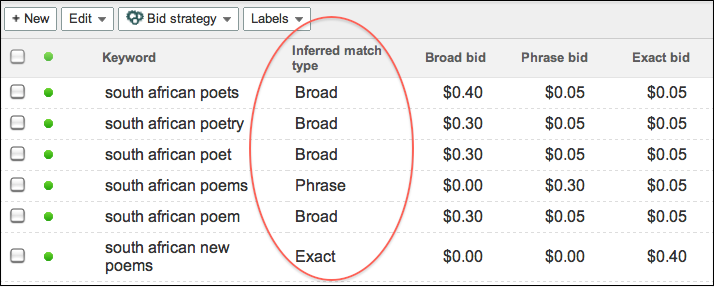
When we launched DS3, we provided the ability to set a bid for each match type on a Microsoft adCenter keyword. As each keyword could correspond to three match types and we couldn’t determine with certainty which match type caused the conversion, we were unable to populate the Match type column in reporting. However, many of you duplicated keywords to have a 1-to-1 match type relationship and asked us to display match type. As a result, the new Inferred match type column allows you to see a match type attributed to your adCenter keywords and makes it easier to compare keywords across engines.


DS3 infers the match type from the bids you have set for adCenter keywords:
  • - If a broad match bid is set (in other words, greater than 0), DS3 assumes it’s a broad match keyword.
  • - If a phrase match bid is set but not broad, DS3 assumes it's a phrase match keyword.
  • - If an exact match bid is set but not phrase or broad, DS3 assumes it's an exact match keyword.
  • - If a content match bid is the only bid set, DS3 will leave the Inferred match typecolumn blank.
After you select the Inferred match type column, you'll be able to see it in DS3 reporting on the UI and on downloaded reports. A few other things to keep in mind:
  • - To make it easier to compare keywords across engines, DS3 will copy the Match type column value into the Inferred match type column for Google AdWords and Yahoo! Search Marketing keywords.
  • - This is a read-only column: You won’t be able to update match type by changing the value in the Inferred match type column and uploading.
  • - This column does not appear in DoubleClick for Advertisers (DFA) reporting. You won’t be able to see a match type for adCenter keywords in DFA.

Upload email confirmations

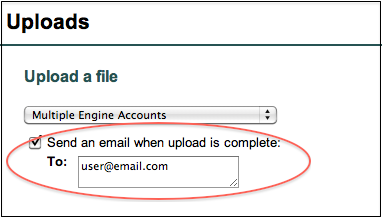
Tired of constantly checking the Uploads list to see if the spinny has stopped and your important upload processed? You can now opt to receive emails when an upload is complete. The email will contain a link to the upload page; if there are errors, you can download the error sheet from the uploads list, make corrections, and attempt the upload again.


Names for emailed reports

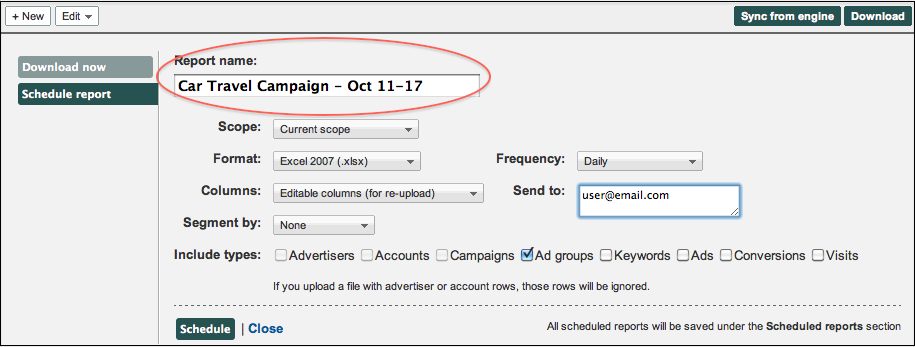
When you set up a report to be emailed from DS3, you can now customize the name that will appear in the email subject line. This is useful if the default name isn’t descriptive enough to differentiate between reports. For example, you could email two reports for the same campaign, but set up different date ranges, and include the date ranges in the report names.


To make sure you learn about new DS3 features as they’re released, enter your email address in the Follow by Email field in the upper righthand corner of the blog and click Submit. You’ll receive an email every time we add a post to the blog.

Posted by the DoubleClick Search Team
Read More
Posted in DoubleClick Search | No comments

Wednesday, 26 October 2011

Attend a DFA Classroom Training

Posted on 13:12 by Unknown

Attend a DoubleClick for Advertisers (DFA) classroom training and learn the fundamentals of DFA and become familiar with the ad trafficking process. Class details and upcoming dates are listed below.

Visit the DoubleClick Learn Center to register (sign-in required).

DFA Fundamentals: This all day course (10am-5pm) is useful for new DFA users who are looking to understand the fundamentals of third-party ad serving including best practices for campaign trafficking, serving your ads and pulling reports.

  • Chicago - November 16
  • San Francisco - November 30
  • New York - December 7

DFA Trafficking Lab: This lab provides users with practice at running campaigns. It covers basic DFA functionality including assigning landing pages to creatives, updating campaigns, setting up geo-targeting and using creative rotation. As a prerequisite, attendees should have taken the DFA Fundamentals class in the previous two months or have less than two months trafficking experience.

  • Chicago - November 17
  • San Francisco - December 1
  • New York - December 8

MediaVisor: Learn more about MediaVisor in this course that covers how to plan and create campaigns, advertisers, site placements and IOs as well as how to send RFPs.

  • Chicago - November 17

To sign up for any upcoming classroom training, visit the DoubleClick Learn Center (sign-in required). And be sure to check back with us on this blog for regular updates to our training schedule.

Posted by Amanda Gangl, DFA Product Trainer

Read More
Posted in DoubleClick for Advertisers, Training | No comments
Newer Posts Older Posts Home
Subscribe to: Posts (Atom)

Popular Posts

  • Introducing an all-new DFA: DoubleClick Campaign Manager
    The phase of adolescence is a transitional one, and this year, on the 15th anniversary of DoubleClick for Advertisers (DFA) we find ourselve...
  • Insights on the fly: Introducing executive reporting from DoubleClick Search
    Search marketers managing multiple campaigns across multiple accounts have to visualize their data in many different ways and tailor reporti...
  • Congratulations DMACs Award Winners
    Congratulations to the winners of the fifth annual Digital Media Advertising Creative Showcase (DMACS) awards! The event took place Thursda...
  • Streamlined Workflow for AdMob Rich Media in DoubleClick Studio and DFA
    Since the launch of DoubleClick Studio in April 2009, we’ve streamlined the workflow for thousands upon thousands of rich media creatives f...
  • DS3: Announcing Several Upload Improvements
    (cross posted from the DoubleClick Search blog . To learn more about DoubleClick Search, contact your Account Manager or request a call from...
  • A new (and improved) look for the DoubleClick site
    Last week, you heard from Neal Mohan at DoubleClick Insights talk about how the digital ad ecosystem is rapidly evolving. To help digital m...
  • Making Mobile Rich Media Front and Center in DoubleClick Studio
    At the end of September, we announced the launch of Google Web Designer, Google’s new HTML5 authoring tool, and last week we propelled the ...
  • Get Your DFA Fundamentals Certification
    We are pleased to announce DoubleClick for Advertisers (DFA) Fundamentals Certification! DFA Fundamentals Certification is the next step for...
  • +1 Button in DFA: Leveraging Social Recommendations in Your Display Ads
    Last March, Google introduced the +1 button on search results to make it easier for people to get recommendations from the people they trus...
  • Extend Your Reach with Remarketing on the Google Content Network
    If you've used remarketing in DoubleClick for Advertisers (DFA) then you know how effective it can be in delivering highly targeted and ...

Categories

  • active view
  • ad creative
  • AdSense
  • Advanced training
  • advertisers
  • Announcements
  • API
  • attribution
  • attribution modeling
  • banner ads
  • brands
  • Cadillac
  • call tracking
  • case study
  • certification
  • consolidation
  • conversion
  • creativity
  • customer examples
  • data
  • data insights
  • dcm
  • DDM
  • DFA
  • DFA Academy
  • DFA6
  • digital marketing
  • Display
  • display benchmarks
  • doubleclick
  • DoubleClick Ad Exchange
  • DoubleClick Ad Planner
  • doubleclick bid manager
  • doubleclick campaign manager
  • doubleclick digital marketing
  • doubleclick floodlight
  • DoubleClick for Advertisers
  • DoubleClick for Publishers
  • DoubleClick Rich Media
  • DoubleClick Search
  • doubleclick studio
  • DSP
  • dynamic creative
  • Events
  • Forrester
  • Google
  • google analytics
  • Google analytics premium
  • google tag manager
  • Google Web Designer
  • hangout on air
  • HTML5
  • IAB
  • IAB rising stars
  • in-stream
  • Industry
  • industry benchmarks
  • Industry Commentary
  • insights
  • interactive in-stream
  • Invite Media
  • Kellogg's
  • launch
  • Lightbox
  • media buying
  • Mindshare
  • MIXX
  • Mobile
  • multi-channel funnels
  • native ads
  • Neal Mohan
  • new features
  • New Release
  • News
  • optimization
  • platform
  • Programmatic
  • Programmatic video
  • publishers
  • Real-time Bidding
  • remarketing
  • reporting
  • Reporting and Analytics
  • Research
  • Rich Media
  • Social Media
  • Studio Certification
  • tag
  • The Weather Channel
  • thinkdoubleclick
  • Tips and Tricks
  • Trafficking
  • Training
  • twohill
  • Updates
  • Video
  • VPAID
  • webinar
  • Webinars
  • Wildfire
  • YouTube

Blog Archive

  • ▼  2013 (89)
    • ▼  November (5)
      • What industry leaders value in a digital marketing...
      • Become a video expert: learn to create innovative,...
      • Insights on the fly: Introducing executive reporti...
      • DoubleClick “Stocking Stuffers”: Festive strategie...
      • Making Mobile Work Across the Advertising Industry
    • ►  October (16)
    • ►  September (5)
    • ►  August (10)
    • ►  July (5)
    • ►  June (8)
    • ►  May (12)
    • ►  April (8)
    • ►  March (7)
    • ►  February (7)
    • ►  January (6)
  • ►  2012 (60)
    • ►  December (7)
    • ►  November (9)
    • ►  October (8)
    • ►  September (5)
    • ►  August (5)
    • ►  July (2)
    • ►  June (5)
    • ►  May (6)
    • ►  April (5)
    • ►  March (5)
    • ►  February (1)
    • ►  January (2)
  • ►  2011 (56)
    • ►  December (5)
    • ►  November (11)
    • ►  October (7)
    • ►  September (3)
    • ►  August (5)
    • ►  July (2)
    • ►  June (6)
    • ►  May (3)
    • ►  April (5)
    • ►  March (4)
    • ►  February (3)
    • ►  January (2)
  • ►  2010 (32)
    • ►  December (2)
    • ►  November (4)
    • ►  October (3)
    • ►  September (1)
    • ►  August (4)
    • ►  July (4)
    • ►  June (3)
    • ►  May (2)
    • ►  April (4)
    • ►  March (3)
    • ►  February (2)
  • ►  2009 (12)
    • ►  November (1)
    • ►  October (1)
    • ►  September (1)
    • ►  August (1)
    • ►  June (2)
    • ►  May (1)
    • ►  April (1)
    • ►  March (2)
    • ►  February (2)
  • ►  2008 (15)
    • ►  December (1)
    • ►  November (1)
    • ►  October (2)
    • ►  August (1)
    • ►  March (2)
    • ►  February (2)
    • ►  January (6)
  • ►  2007 (11)
    • ►  December (2)
    • ►  November (3)
    • ►  October (3)
    • ►  August (1)
    • ►  July (1)
    • ►  May (1)
Powered by Blogger.

About Me

Unknown
View my complete profile