Html5 Mobile Support

  • Subscribe to our RSS feed.
  • Twitter
  • StumbleUpon
  • Reddit
  • Facebook
  • Digg

Monday, 7 October 2013

Join an upcoming DCM or DFA training webinar

Posted on 06:00 by Unknown
With the recent DoubleClick Campaign Manager announcement, now is a great time to learn the about the basics in our DCM Fundamentals webinar.  For those who have already started the move, we also have a webinar focused on helping you prepare for upgrading to DCM.

Take a look at our upcoming DCM and DFA webinars and enroll through the Training page in our Help Center (sign-in required).


DCM Fundamentals - 10/23, 11/20, and 12/11
This webinar is intended for new users to DoubleClick Campaign Manager (DCM). It will provide an introduction to the fundamentals of DCM (Trafficking) and offer best practices for beginners.


DFA6 to DCM for Existing Users - 10/9, 10/17, 11/6, and 12/3
This webinar will focus on the differences between DFA6 and DCM functionality (i.e. what to watch out for when your account is upgraded). Ideal for clients that have been using DFA and will be upgrading to DCM (DoubleClick Campaign Manager) soon.


Reporting: Report Builder - 10/31 and 12/5
Learn how to run reports in Report Builder, and slice and dice data in the Summary tab (dashboard view). This session is designed for users with a basic knowledge of DFA6 or DCM.

If you’re not familiar with DCM or DFA, attend the Fundamentals webinar session first.


Reporting: Attribution - 10/17, 11/14, and 12/19
In this session, you’ll get a deep dive on the Attribution tab in DFA Reporting. Get a look at uses for Multi-channel funnels, Attribution, and Modeling. This session is also helpful for those upgrading from DFA to DCM to expand knowledge of what the Reporting tool offers.

If you’re not familiar with Report Builder, we suggest attending the Report Builder webinar first.


DFA Fundamentals - 10/16, 10/30, 11/13, 12/4, and 12/18
Learn the basics of trafficking in DFA6. The bulk of the session focuses on ad trafficking, but touches briefly on Floodlight tags and DFA Reporting. DFA Fundamentals is the first step if you’re new to third-party ad serving and DFA.


MediaVisor Fundamentals - 10/15, 11/19, and 12/17
Learn the most common uses of MediaVisor, including how to plan and create campaigns, advertisers, and site placements. You’ll also learn how to send RFPs and IOs, as well as how to traffic placements from MediaVisor to DFA.

Some sessions mention prerequisites where we recommend background knowledge. Please take note of these to ensure you get the most out of each session. Lastly, be aware of any regional time differences before enrolling in any of the live sessions.

Excited about a webinar but running into a scheduling conflict? Be sure to check out pre-recorded webinars in the DCM Help Center as well as the DFA Help Center – you might be able to find a session already recorded and ready to watch.

Still on DFA6? Get trained online with our DFA Fundamentals eLearning (also available in Spanish, Japanese, Portuguese, and Swedish!) and live webinar sessions.

Don’t forget to Sign up to receive the latest news, product updates, features, tips, and research information from DoubleClick!

Posted by Jessica Osborne, DFA Product Trainer
Read More
Posted in advertisers, DFA, Display, doubleclick, doubleclick campaign manager, doubleclick digital marketing, doubleclick floodlight, DoubleClick for Advertisers, Reporting and Analytics, Training | No comments

Tuesday, 1 October 2013

Tutorial Tuesday: Learn the Google Web Designer Interface

Posted on 09:37 by Unknown

Yesterday we launched the public beta of Google Web Designer – a professional-quality design tool that makes it easy to design HTML5 creative, for free.

While we built the tool to be fairly intuitive, we want to make sure you have the resources you need to get started. So beginning today and continuing through the month of October, we’ll be posting “Tutorial Tuesday” blog posts to highlight important aspects of the tool.

This week, we’ll give you a general overview of the tool and show you how to add text and tags to your projects. Over the next few weeks, we’ll post on additional topics such as making your projects more interactive with motion, making them more beautiful with design elements, and transforming your work into rich media ad creative. 

Take a tour of Google Web Designer
When you first download Google Web Designer, you’ll want to get to know the interface. With Google Web Designer, you can: 
  • Start designing immediately with familiar menus and panels
  • Design the way you like by toggling between Design view and Code view
  • Test your work in a number of browsers with the Preview button
  • Get your work on the ad networks of your choice by publishing your projects
Take a full walk-through of the Google Web Designer interface in this video. 

Add text
With Google Web Designer, it’s easy to add text to your projects. You can transform text into headings, paragraph text, and links, and make your text stand out with hundreds of free, open source web fonts. Learn more.

Add tags
Google web designer has a Tag menu that helps you add div img, video, or custom HTML elements to your documents. You can change the color and the border radius of your tags in just a few clicks. Learn more.

Can’t wait until next Tuesday?
In our next Tutorial Tuesday post, we’ll talk about how to use Google Web Designer’s Timeline to add motion to your creative. If you can’t wait until next week, you can watch our two Timeline videos here and here, and you can watch all of our videos on the Google Web Designer YouTube Channel. You can also check out our getting started guide for more information. 

Join the conversation
We want to hear what you think of Google Web Designer, so feel free to send us feedback on our user forum or our Google+ page. We’re excited to have you help us shape the future of our new tool.

Posted by Jasmine Rogers, Program Manager, Google Web Designer
Read More
Posted in doubleclick studio, Google Web Designer, HTML5, Rich Media | No comments

Monday, 30 September 2013

Google Web Designer beta now available: Build beautiful HTML5 creative with ease.

Posted on 09:10 by Unknown

By now, it’s evident that multi-screen consumption is the way of the future; mobile and tablet devices are becoming consumers’ first screens, so the content that is developed needs to work seamlessly across these screens. There are already more end-users in HTML5-compatible environments than there are in Flash-compatible environments, and HTML5 ad spend is expected to overtake Flash spend within the next two years. (1) But until recently, advertisers didn't have the tools they needed to easily develop content fit for today's cross-screen experiences.

“Unlocking the HTML5 Opportunity: What’s the Holdup?” 
To shine a light on the issues, we commissioned a research study with Illuminas to uncover the barriers that agencies face when buying on and developing for mobile platforms. We found that advertisers expect the amount of mobile and tablet work they do to increase by 41% over the next 12 months, and over 67% of respondents believe that it’s important to design specifically for mobile campaigns.


However, even though the amount of mobile and tablet work is expected to increase, cross-screen creative can be difficult to adopt. In our white paper, “Unlocking the HTML5 Opportunity: What’s the Holdup?” we present four main challenges that agencies face when approaching mobile advertising. One key challenge is that there are too many choices to make when developing for mobile -- too many platforms, browsers, and devices to build for, and no tools that simplify the development process.

Build once, run anywhere 
We’re working hard to solve this development challenge by offering agencies powerful yet easy-to-use tools for HTML5 production. In this vein, we announced DoubleClick Studio Layouts for HTML5 back in August, which lets you create HTML5 ads in minutes, and last week we announced Ready Creatives in AdWords, which creates HTML5 ads for you in seconds.


Today, we’re excited to announce the public beta of Google Web Designer, a new professional-quality design tool that makes HTML5 creative accessible to everyone from the designer to the dabbler.

Google Web Designer enables you to:
  1. Create animated HTML5 creative, with a robust, yet intuitive set of design tools. 
  2. View and edit the code behind your designs and see your edits reflected back on the stage automatically. 
  3. Build ad creatives seamlessly for DoubleClick and AdMob, or publish them to any generic environment you choose. 
  4. Receive updates to the product automatically, without having to re-download the application.
  5. Access all of this entirely for free.

Watch the Demo: A quick glimpse of Google Web Designer

Ready to give it a spin? 
  • Download Google Web Designer. 
  • Read through our getting started guide. 
  • Send us feedback! We need your input to make this tool even better, so share your ideas with us in our user forum or on our Google+ page. We’re working hard over the next couple quarters to add new features and improvements to make the product an even more robust offering. 
HTML5 is a universal language for building beautiful, engaging content that can run across desktops, smartphones, and tablets. We think that Google Web Designer will be the key to making HTML5 accessible to people throughout the industry, getting us closer to the goal of “build once, run anywhere.”

Posted by Sean Kranzberg, Engineering Manager, Google Web Designer 

(1) StatCounter, Top 12 Browser Versions in North America, February 2012 to August 2013 

Read More
Posted in DoubleClick Rich Media, doubleclick studio, HTML5, Mobile | No comments

Wednesday, 25 September 2013

Introducing an all-new DFA: DoubleClick Campaign Manager

Posted on 02:08 by Unknown
The phase of adolescence is a transitional one, and this year, on the 15th anniversary of DoubleClick for Advertisers (DFA) we find ourselves celebrating a big milestone: an entirely rebuilt campaign management platform for marketers and agencies, the coming of age of DFA. In June, we announced that DoubleClick Campaign Manager would be available to all advertisers in the coming months, and today I’m excited to announce that we’ve launched globally.


DoubleClick Campaign Manager is at the core of our DoubleClick Digital Marketing platform. It re-imagines how marketers and agencies manage the entire scope of their digital marketing efforts - from planning and executing, to measuring and optimizing their campaigns.

Intuitive workflows that give you back time. With DoubleClick Campaign Manager, we started by building new, time-saving features into a noticeably more beautiful and responsive user interface. This means the time gained from speeding things up can free up opportunities for you and your team to work on higher-value activities.

A new trafficking interface loads up to 5 times faster than before, and ads and ad changes now go live in just 2 minutes. You can also view campaign information centrally from a single page, rather than flipping across tabs. With in-line and bulk editing, we’ve greatly reduced the number of clicks to perform common trafficking tasks.
Easy tagging. Floodlight, DoubleClick’s universal conversion tag is integrated with Google Tag Manager. Now, you can push Floodlight tags directly from DoubleClick Campaign Manager to Google Tag Manager (and your site), reducing the time it takes to implement tags from weeks, to minutes.
Programmatic and reservations in one place. With one unified UI and reporting system across DoubleClick Campaign Manager and DoubleClick Bid Manager, you get access to accurate, de-duplicated conversion data. Creatives and tags are shared, and remarketing lists are synced so you can engage your audience seamlessly across every part of your buy.

Seamless support for mobile/HTML5, video, and rich media formats. DoubleClick Campaign Manager makes it easier to produce, scale, and traffic creative formats - from mobile and video, to rich media and dynamic.

A mobile-first approach. Mobile is built into the fabric of our platform. Support for IAB-compliant HTML5 creatives means a single creative can render on any device and help you take advantage of the engaging, rich-media capabilities of HTML5. We’ve ensured that your tags work everywhere too. There is no longer a separate mobile tag, and mobile targeting and reporting dimensions are automatically available in all served tags.
Powerful video features. An intuitive approach to video trafficking allows you to share and re-use companion ads across videos, and get a detailed performance breakdown. And support for the next wave of video formats - including interactive video and dynamic VPAID - helps you deliver more engaging videos. Additionally, you can now track your YouTube TrueView campaigns alongside all your other placements, allowing for more holistic insights.
Easier Rich Media. Integration with DoubleClick Studio allows you to easily sync creatives into DoubleClick Campaign Manager, saving you time and effort. New preview functionality allows you to test and QA creatives without relying on your creative agency. And you can create ads that are tailored to your audience with dynamic creative that optimizes the best combination of variables to serve the “perfect ad” for every impression.

New audience features help you surface key insights and optimize campaigns for better performance.

Create powerful remarketing lists based on custom Floodlight variables. Your lists are automatically shared with DoubleClick Bid Manager and updated in real-time, helping you establish second contact with your audience quickly.
New audience reporting gives you strategic insights. Audience is now a new dimension in standard reporting, so you can understand the segments with which your message best resonated. If you use DoubleClick Bid Manager, audience composition reporting shows you how your first party lists overlap with your third party lists. We will be bringing this capability to all customers soon.

Enhancements in reporting for better decisions. Reporting has always been the backbone of the DoubleClick platform, with de-duplicated reporting across channels. We built on this foundation last year with Report Builder, Multi-Channel Funnels, and DoubleClick Verification. Now, with DoubleClick Campaign Manager, we bring you even more insightful reporting tools:

Powerful attribution with Multi-Channel Funnels helps you better understand your customers’ journey from initial interaction to final conversion and more accurately credit the channels and touchpoints that contributed to your conversions. With the Attribution Modeling Tool, you can choose from several basic models of assigning credit for impressions and clicks, or you can create your own model in a way that makes the most sense for your business.
Integration of Wildfire’s social technology platform with the DoubleClick attribution suite means you can measure the effectiveness of your campaigns in driving social conversions. Additionally, social ad impressions and clicks can be tracked directly in DoubleClick Campaign Manager, allowing you to measure your social programs alongside the rest of your efforts.

When DoubleClick for Advertisers was founded in 1998, we invested in the promise that digital can forge connections and bring value to advertisers, publishers and users. Today, as we celebrate its 15th anniversary, we’re excited to be investing in the next wave of digital marketing where we are even more connected than ever before.

If you’re an existing DFA customer, reach out to your account manager about upgrading to DoubleClick Campaign Manager today. You can stay on top of new updates by following us on our Google+ page.

Payam Shodjai
Senior Product Manager, DoubleClick Campaign Manager
Read More
Posted in DFA, Display, doubleclick bid manager, doubleclick campaign manager, doubleclick digital marketing | No comments

Monday, 16 September 2013

Next Week! Join us for a Hangout On Air: Moving at the Speed of Retail

Posted on 11:25 by Unknown
From managing inventory levels, to juggling promotions and tackling catalog churn -- online retail moves quickly, and so should you.

To help you go faster and act smarter with a rapidly-changing retail landscape, we invite you to join our Hangout on Air: Moving at the Speed of Retail. Come hear search leaders from iProspect, Performics, and DoubleClick discuss the latest industry trends, challenges and use cases in retail SEM today. Some of the topics we’ll cover include:
  • Tying inventory levels and promotions to search campaigns, in real-time
  • Boosting performance with retail-specific bid optimization strategies and best practices
  • Finding more cross-channel opportunities through remarketing tactics

Participants:
Jessica Dearien, Account Leader, iProspect
Dave Strong, Group Account Director, Performics
Matthew Eichner, Head of DoubleClick Search
Dan Arwady, DoubleClick Search Account Manager

Register here to attend the Hangout on September 25th, 2013 at 11:00am PST / 1:00pm CST / 2:00pm EST. Tune in for the session, and interact with the panel via Hangouts-enabled Q&A.

We hope to see you there!
Read More
Posted in | No comments

Tuesday, 10 September 2013

Get customized, role-based training with DFA Academy

Posted on 11:00 by Unknown
When you’re in display advertising, school is always in session. And now is is the perfect time to build your skills!

We’ve heard from DFA users that they need more customized learning based on how they use DFA. For example, if you’re an ad trafficker, you might need a broad understanding ranging from the basics all the way to troubleshooting. If you’re an analyst, you might not need to know all the details a media planner might be responsible for but you might still like to know how conversion data is tracked and counted.

To help you learn through a more established, role-based curriculum, we’ve launched DFA Academy, an easy-to-use, self-paced learning path designed to guide you through core help articles and online training courses.

DFA Academy includes these checklists:
  • Basics for new users: The core curriculum, including DFA Fundamentals eLearning and certification
  • Implementation guide: Learn how to implement a new DFA account or advertiser
  • QA and troubleshooting: It’s not shop class, but you’ll learn all about QA’ing tags, creatives, and more
  • Advanced topics: Become an expert through DFA Personal Trainer for Advanced Users, learn about integrations with DoubleClick Bid Manager, Google Tag Manager, and other topics
  • Rich Media: When Rich Media isn’t an extracurricular activity, learn tips and best practices for trafficking DoubleClick Rich Media in your DFA account
Since DFA Academy covers a lot of material, we've set it up in checklist format so you can track progress by checking the boxes at the end of each step. Your progress will be saved so if you have to take a break, you can come back anytime and pick up where you left off.

Whether you're a freshman ad trafficker new to display, an analyst on the Dean’s list, or a Media planner feeling like a 5th year student, you can find customized training based on your role to help you ace DFA.

Keep in mind, the DFA Help Center is only available to current DFA users so you'll need to sign in with the Google account you use for DFA.

Want extra credit? Be sure to also sign up for the DoubleClick Digest to get the latest DoubleClick news, research, events and product updates.

Posted by Sarah Payne, DFA Product Trainer
Read More
Posted in Advanced training, advertisers, DFA, DFA Academy, doubleclick, DoubleClick for Advertisers, Training | No comments

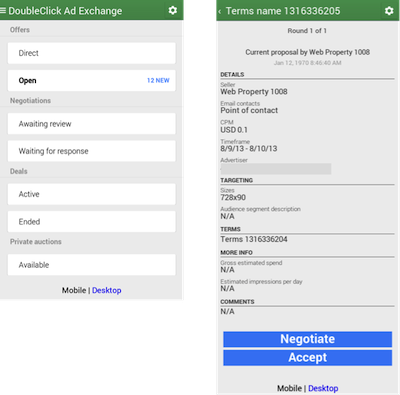
Now on Mobile - The DoubleClick Ad Exchange Deals Interface

Posted on 09:00 by Unknown
DoubleClick Ad Exchange (AdX) launched the first Preferred Deal in 2012 and the first Private Auction in 2013 to help publishers and advertisers create greater opportunities with programmatic buying. Since the beginning of this year we’ve seen the number of Preferred Deals double, the number of Preferred Deals impressions grow by 2.5X, and Private Auction impressions explode from nothing to millions per day. As these programmatic deal types become more important for our partners, they started asking for the ability to negotiate deals on the go. So today, we’re excited to launch a Mobile version of the DoubleClick Ad Exchange Deals interface.

Negotiate on the go
The new DoubleClick Ad Exchange Deals interface for mobile allows buyers and sellers to check the status of a Preferred Deal or Private Auction on any device. When you sign into the Deals interface on your phone or tablet, the mobile site will load automatically. From there, buyers and sellers can view, edit, accept, or stop existing deals.
If at any time you need to access other features, you can switch to the classic version of the Deals UI by clicking on the Desktop link at the bottom of the screen.

We built this mobile interface to help DoubleClick Ad Exchange partners continue their deal negotiations while away from their desks and it’s available now for all users. To access it, just visit www.google.com/adxbuyer/uploader from your mobile browser and visit our Help Center for buyers or Help Center for sellers to learn more.


Posted by Michael Smith, Product Manager 
Built by Brandon Krieger, Software Engineering Intern
Read More
Posted in DoubleClick Ad Exchange, doubleclick bid manager, Programmatic | No comments
Newer Posts Older Posts Home
Subscribe to: Posts (Atom)

Popular Posts

  • Introducing an all-new DFA: DoubleClick Campaign Manager
    The phase of adolescence is a transitional one, and this year, on the 15th anniversary of DoubleClick for Advertisers (DFA) we find ourselve...
  • Insights on the fly: Introducing executive reporting from DoubleClick Search
    Search marketers managing multiple campaigns across multiple accounts have to visualize their data in many different ways and tailor reporti...
  • Congratulations DMACs Award Winners
    Congratulations to the winners of the fifth annual Digital Media Advertising Creative Showcase (DMACS) awards! The event took place Thursda...
  • Streamlined Workflow for AdMob Rich Media in DoubleClick Studio and DFA
    Since the launch of DoubleClick Studio in April 2009, we’ve streamlined the workflow for thousands upon thousands of rich media creatives f...
  • DS3: Announcing Several Upload Improvements
    (cross posted from the DoubleClick Search blog . To learn more about DoubleClick Search, contact your Account Manager or request a call from...
  • A new (and improved) look for the DoubleClick site
    Last week, you heard from Neal Mohan at DoubleClick Insights talk about how the digital ad ecosystem is rapidly evolving. To help digital m...
  • Making Mobile Rich Media Front and Center in DoubleClick Studio
    At the end of September, we announced the launch of Google Web Designer, Google’s new HTML5 authoring tool, and last week we propelled the ...
  • Get Your DFA Fundamentals Certification
    We are pleased to announce DoubleClick for Advertisers (DFA) Fundamentals Certification! DFA Fundamentals Certification is the next step for...
  • +1 Button in DFA: Leveraging Social Recommendations in Your Display Ads
    Last March, Google introduced the +1 button on search results to make it easier for people to get recommendations from the people they trus...
  • Extend Your Reach with Remarketing on the Google Content Network
    If you've used remarketing in DoubleClick for Advertisers (DFA) then you know how effective it can be in delivering highly targeted and ...

Categories

  • active view
  • ad creative
  • AdSense
  • Advanced training
  • advertisers
  • Announcements
  • API
  • attribution
  • attribution modeling
  • banner ads
  • brands
  • Cadillac
  • call tracking
  • case study
  • certification
  • consolidation
  • conversion
  • creativity
  • customer examples
  • data
  • data insights
  • dcm
  • DDM
  • DFA
  • DFA Academy
  • DFA6
  • digital marketing
  • Display
  • display benchmarks
  • doubleclick
  • DoubleClick Ad Exchange
  • DoubleClick Ad Planner
  • doubleclick bid manager
  • doubleclick campaign manager
  • doubleclick digital marketing
  • doubleclick floodlight
  • DoubleClick for Advertisers
  • DoubleClick for Publishers
  • DoubleClick Rich Media
  • DoubleClick Search
  • doubleclick studio
  • DSP
  • dynamic creative
  • Events
  • Forrester
  • Google
  • google analytics
  • Google analytics premium
  • google tag manager
  • Google Web Designer
  • hangout on air
  • HTML5
  • IAB
  • IAB rising stars
  • in-stream
  • Industry
  • industry benchmarks
  • Industry Commentary
  • insights
  • interactive in-stream
  • Invite Media
  • Kellogg's
  • launch
  • Lightbox
  • media buying
  • Mindshare
  • MIXX
  • Mobile
  • multi-channel funnels
  • native ads
  • Neal Mohan
  • new features
  • New Release
  • News
  • optimization
  • platform
  • Programmatic
  • Programmatic video
  • publishers
  • Real-time Bidding
  • remarketing
  • reporting
  • Reporting and Analytics
  • Research
  • Rich Media
  • Social Media
  • Studio Certification
  • tag
  • The Weather Channel
  • thinkdoubleclick
  • Tips and Tricks
  • Trafficking
  • Training
  • twohill
  • Updates
  • Video
  • VPAID
  • webinar
  • Webinars
  • Wildfire
  • YouTube

Blog Archive

  • ▼  2013 (89)
    • ▼  November (5)
      • What industry leaders value in a digital marketing...
      • Become a video expert: learn to create innovative,...
      • Insights on the fly: Introducing executive reporti...
      • DoubleClick “Stocking Stuffers”: Festive strategie...
      • Making Mobile Work Across the Advertising Industry
    • ►  October (16)
    • ►  September (5)
    • ►  August (10)
    • ►  July (5)
    • ►  June (8)
    • ►  May (12)
    • ►  April (8)
    • ►  March (7)
    • ►  February (7)
    • ►  January (6)
  • ►  2012 (60)
    • ►  December (7)
    • ►  November (9)
    • ►  October (8)
    • ►  September (5)
    • ►  August (5)
    • ►  July (2)
    • ►  June (5)
    • ►  May (6)
    • ►  April (5)
    • ►  March (5)
    • ►  February (1)
    • ►  January (2)
  • ►  2011 (56)
    • ►  December (5)
    • ►  November (11)
    • ►  October (7)
    • ►  September (3)
    • ►  August (5)
    • ►  July (2)
    • ►  June (6)
    • ►  May (3)
    • ►  April (5)
    • ►  March (4)
    • ►  February (3)
    • ►  January (2)
  • ►  2010 (32)
    • ►  December (2)
    • ►  November (4)
    • ►  October (3)
    • ►  September (1)
    • ►  August (4)
    • ►  July (4)
    • ►  June (3)
    • ►  May (2)
    • ►  April (4)
    • ►  March (3)
    • ►  February (2)
  • ►  2009 (12)
    • ►  November (1)
    • ►  October (1)
    • ►  September (1)
    • ►  August (1)
    • ►  June (2)
    • ►  May (1)
    • ►  April (1)
    • ►  March (2)
    • ►  February (2)
  • ►  2008 (15)
    • ►  December (1)
    • ►  November (1)
    • ►  October (2)
    • ►  August (1)
    • ►  March (2)
    • ►  February (2)
    • ►  January (6)
  • ►  2007 (11)
    • ►  December (2)
    • ►  November (3)
    • ►  October (3)
    • ►  August (1)
    • ►  July (1)
    • ►  May (1)
Powered by Blogger.

About Me

Unknown
View my complete profile